 6e2392f366
# HLS/DASH: Fix dispose() to cleanup files after unpublish ## Summary Fixes a bug where HLS/DASH files are not deleted after the configured `hls_dispose`/`dash_dispose` timeout. ## Problem When a stream is unpublished: 1. `on_unpublish()` is called and sets `enabled_ = false` 2. After the dispose timeout, `cycle()` calls `dispose()` 3. `dispose()` immediately returns due to `if (!enabled_)` check at line 2722 (HLS) and line 891 (DASH) 4. `controller_->dispose()` is never called 5. Files remain on disk indefinitely **Observed behavior**: - Stream stopped at 11:32:42 - `dispose()` called at 11:33:14 (after 30s timeout) - Log shows "hls cycle to dispose hls" but no "gracefully dispose hls" message - Files remain on disk ## Root Cause Commit550760f2dintroduced an early return in `dispose()` when `!enabled_`, which prevents file cleanup after `on_unpublish()` has already been called and set `enabled_` to false. ## Solution Reorder the logic in `dispose()` to: 1. Check if dispose is enabled (hls_dispose/dash_dispose > 0) first 2. Call `on_unpublish()` only if `enabled_` is still true (prevents duplicate calls) 3. Always call `controller_->dispose()` to cleanup files when dispose timeout occurs This ensures files are properly cleaned up while still preventing duplicate `on_unpublish()` calls. ## Changes Made - **trunk/src/app/srs_app_hls.cpp** (lines 2718-2734): Reordered dispose() logic - **trunk/src/app/srs_app_dash.cpp** (lines 887-902): Reordered dispose() logic - **trunk/doc/CHANGELOG.md**: Added v7.0.137 entry ## Testing Recommendation To verify the fix: 1. Start RTMP stream to `/live/test`: ```bash ffmpeg -re -i test.mp4 -c copy -f flv rtmp://localhost:1935/live/test ``` 2. Wait for HLS segments to be created: ```bash ls -la /path/to/hls/live/test/ ``` 3. Stop the stream (Ctrl+C) 4. Wait for `hls_dispose` timeout (default 120s, or 30s with your config): ```bash # Watch logs for "hls cycle to dispose hls" and "gracefully dispose hls" tail -f srs.log ``` 5. Verify files are deleted: ```bash ls -la /path/to/hls/live/test/ # Should be empty or directory removed ``` **Expected results**: - Before fix: Files remain on disk - After fix: Files are deleted, logs show "gracefully dispose hls" ## Impact - **Risk**: Low - minimal logic change, only reordering of checks - **Breaking changes**: None - **Performance**: No impact - **Compatibility**: Fixes existing bug, improves expected behavior ## Checklist - [x] Code follows project style - [x] Both HLS and DASH are fixed - [x] CHANGELOG updated - [x] Tested locally (recommended before merge) - [x] No breaking changes ## Related Issues - Regression introduced in:550760f2d- Related to: #865 (hls_dispose feature) --------- Co-authored-by: Jacob Su <suzp1984@gmail.com>
SRS(Simple Realtime Server)








SRS/7.0 (Kai) is a simple, high-efficiency, and real-time video server, supporting RTMP/WebRTC/HLS/HTTP-FLV/SRT/MPEG-DASH/GB28181, Linux/macOS, X86_64/ARMv7/AARCH64/M1/RISCV/LOONGARCH/MIPS, with codec support for H.264, H.265, AV1, VP9, AAC, Opus, and G.711, and essential features.
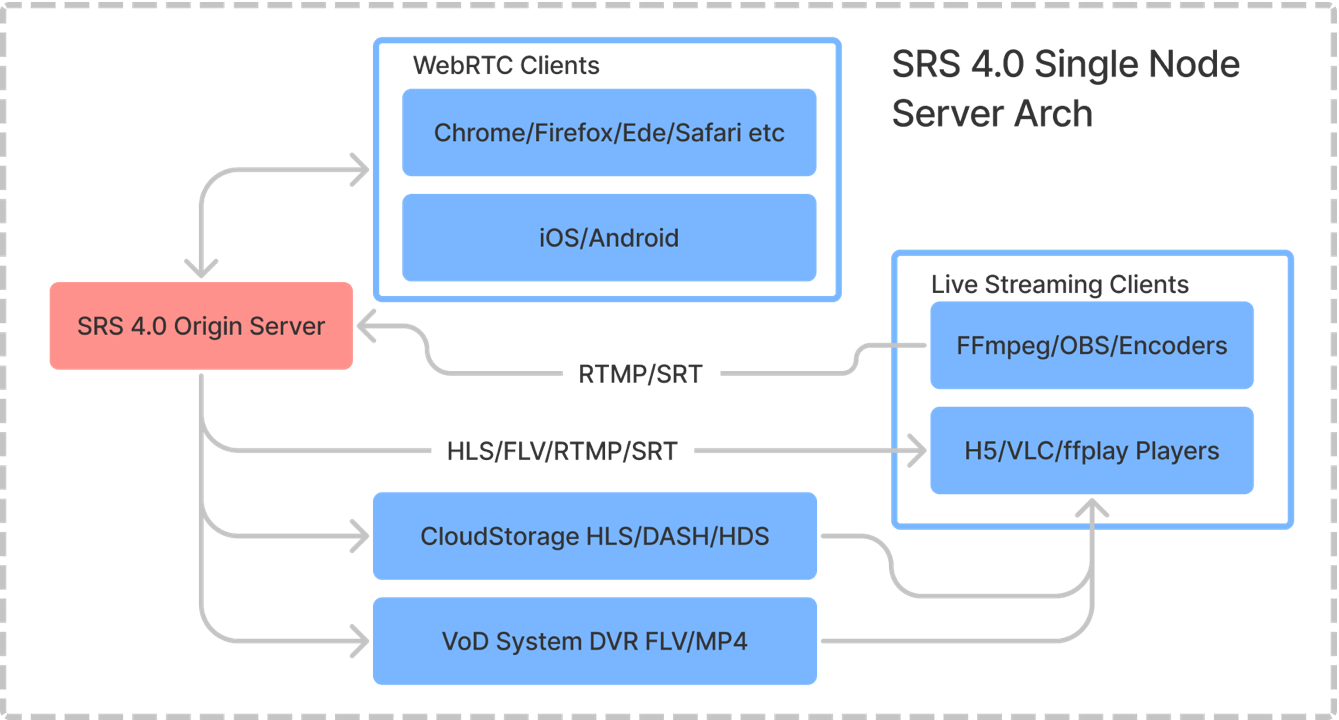
Note: For more details on the single-node architecture for SRS, please visit the following link.
SRS is licenced under MIT, and some third-party libraries are distributed under their licenses.
Usage
Please check the Getting Started guide in English or Chinese. We highly recommend using SRS with docker:
docker run --rm -it -p 1935:1935 -p 1985:1985 -p 8080:8080 \
    -p 8000:8000/udp -p 10080:10080/udp ossrs/srs:6
Tips: If you're in China, use this image
registry.cn-hangzhou.aliyuncs.com/ossrs/srs:6for faster speed.
Open http://localhost:8080/ to verify, and then stream using the following FFmpeg command:
ffmpeg -re -i ./doc/source.flv -c copy -f flv -y rtmp://localhost/live/livestream
Alternatively, stream by OBS using the following configuration:
- Service:
Custom - Server:
rtmp://localhost/live - Stream Key:
livestream
Play the following streams using media players:
- To play an RTMP stream with URL
rtmp://localhost/live/livestreamon VLC player, open the player, go to Media > Open Network Stream, enter the URL and click Play. - You can play HTTP-FLV stream URL http://localhost:8080/live/livestream.flv on a webpage using the srs-player, an HTML5-based player.
- Use srs-player for playing HLS stream with URL http://localhost:8080/live/livestream.m3u8.
If you'd like to use WebRTC, convert RTMP to WebRTC, or convert WebRTC to RTMP, please check out the wiki documentation in either English or Chinese.
To learn more about RTMP, HLS, HTTP-FLV, SRT, MPEG-DASH, WebRTC protocols, clustering, HTTP API, DVR, and transcoding, please check the documents in English or Chinese.
If you want to use an IDE, VSCode is recommended. VSCode supports macOS, and Linux platforms. The settings are ready. All you need to do is open the folder with VSCode and enjoy the efficiency brought by the IDE. See VSCode README for details.
Sponsor
Would you like additional assistance from us? By becoming a sponsor or backer of SRS, we can provide you with the support you need:
- Backer: $5 per month, online text chat support through Discord.
- Sponsor: $100 per month, online text chat plus online meeting support.
Please visit OpenCollective to become a backer or sponsor, and send us a direct message on Discord. We are currently providing support to the developers listed below:
At SRS, our goal is to create a free, open-source community that helps developers all over the world build high-quality streaming and RTC platforms for their businesses.
Contributing
The maintainers, and contributors are listed here. The maintainers who made significant contributions and maintained parts of SRS are listed below, ranked by the number of commits:
- Winlin: Founder of the project, focusing on ST and Issues/PR. Responsible for architecture and maintenance.
- XiaoZhihong: Concentrates on WebRTC/QUIC and SRT, with expertise in network QoS. Contributed to ARM on ST and was the original contributor for WebRTC.
- ChenHaibo: Specializes in GB28181 and HTTP API, contributing to patches for FFmpeg with WHIP.
- ZhangJunqin: Focused on H.265, Prometheus Exporter, and API module.
- XiaLixin: Specializes in GB28181, with expertise in live streaming and WebRTC.
- Jacob Su: Jacob Su has contributed to various modules of SRS.
- ShiWei: Specializes in SRT and H.265, maintaining SRT and FLV patches for FFmpeg. An expert in codecs and FFmpeg.
- ChenGuanghua: Focused on WebRTC/QoS and introduced the Asan toolchain to SRS.
- LiPeng: Concentrates on WebRTC and contributes to memory management and smart pointers.
- ZhaoWenjie: One of the earliest contributors, focusing on HDS. Has expertise in client technology.
- WuPengqiang: Focused on H.265, initially contributed to the FFmpeg module in SRS for transcoding AAC with OPUS for WebRTC.
A huge THANK YOU goes out to:
- All the contributors of SRS.
- All the friends of SRS who gave big support.
- Genes, Mabbott, and Michael Talyanksy for making and sharing State Threads.
We're really thankful to everyone in the community for helping us find bugs and improve the project. To stay in touch and keep helping our community, please check out this guide.
LICENSE
SRS is licenced under MIT, and some third-party libraries are distributed under their licenses.
Releases
- 2025-12-03, Release v6.0-r0, v6.0-r0, 6.0 release0, v6.0.184, 170962 lines.
- 2025-11-03, Release v6.0-b3, v6.0-b3, 6.0 beta3, v6.0.183, 170957 lines.
- 2025-10-16, Release v6.0-b2, v6.0-b2, 6.0 beta2, v6.0.181, 170948 lines.
- 2025-09-15, Release v6.0-b1, v6.0-b1, 6.0 beta1, v6.0.177, 170611 lines.
- 2025-08-12, Release v6.0-b0, v6.0-b0, 6.0 beta0, v6.0.172, 170417 lines.
- 2025-05-03, Release v6.0-a2, v6.0-a2, 6.0 alpha2, v6.0.165, 169712 lines.
- 2024-09-01, Release v6.0-a1, v6.0-a1, 6.0 alpha1, v6.0.155, 169636 lines.
- 2024-07-27, Release v6.0-a0, v6.0-a0, 6.0 alpha0, v6.0.145, 169259 lines.
- 2024-07-04, Release v6.0-d6, v6.0-d6, 6.0 dev6, v6.0.134, 168904 lines.
- 2024-06-15, Release v6.0-d5, v6.0-d5, 6.0 dev5, v6.0.129, 168454 lines.
- 2024-02-15, Release v6.0-d4, v6.0-d4, 6.0 dev4, v6.0.113, 167695 lines.
- 2023-11-19, Release v6.0-d3, v6.0-d3, 6.0 dev3, v6.0.101, 167560 lines.
- 2023-09-28, Release v6.0-d2, v6.0-d2, 6.0 dev2, v6.0.85, 167509 lines.
- 2023-08-31, Release v6.0-d1, v6.0-d1, 6.0 dev1, v6.0.72, 167135 lines.
- 2023-07-09, Release v6.0-d0, v6.0-d0, 6.0 dev0, v6.0.59, 166739 lines.
- 2024-06-15, Release v5.0-r3, v5.0-r3, 5.0 release3, v5.0.213, 163585 lines.
- 2024-04-03, Release v5.0-r2, v5.0-r2, 5.0 release2, v5.0.210, 163515 lines.
- 2024-02-15, Release v5.0-r1, v5.0-r1, 5.0 release1, v5.0.208, 163441 lines.
- 2023-12-30, Release v5.0-r0, v5.0-r0, 5.0 release0, v5.0.205, 163363 lines.
- 2023-11-19, Release v5.0-b7, v5.0-b7, 5.0 beta7, v5.0.200, 163305 lines.
- 2023-10-25, Release v5.0-b6, v5.0-b6, 5.0 beta6, v5.0.195, 163303 lines.
- 2023-09-28, Release v5.0-b5, v5.0-b5, 5.0 beta5, v5.0.185, 163254 lines.
- 2023-08-31, Release v5.0-b4, v5.0-b4, 5.0 beta4, v5.0.176, 162919 lines.
- 2023-08-02, Release v5.0-b3, v5.0-b3, 5.0 beta3, v5.0.170, 162704 lines.
- 2023-07-09, Release v5.0-b2, v5.0-b2, 5.0 beta2, v5.0.166, 162520 lines.
- 2023-06-11, Release v5.0-b1, v5.0-b1, 5.0 beta1, v5.0.157, 162494 lines.
- 2023-05-14, Release v5.0-b0, v5.0-b0, 5.0 beta0, v5.0.155, 162600 lines.
- 2023-03-23, Release v5.0-a5, v5.0-a5, 5.0 alpha5, v5.0.148, 162066 lines.
- 2023-02-12, Release v5.0-a4, v5.0-a4, 5.0 alpha4, v5.0.141, 161897 lines.
- 2023-01-02, Release v5.0-a3, v5.0-a3, 5.0 alpha3, v5.0.128, 161327 lines.
- 2022-12-18, Release v5.0-a2, v5.0-a2, 5.0 alpha2, v5.0.112, 161233 lines.
- 2022-12-01, Release v5.0-a1, v5.0-a1, 5.0 alpha1, v5.0.100, 160817 lines.
- 2022-11-25, Release v5.0-a0, v5.0-a0, 5.0 alpha0, v5.0.98, 159813 lines.
- 2022-11-22, Release v4.0-r4, v4.0-r4, 4.0 release4, v4.0.268, 145482 lines.
- 2022-09-16, Release v4.0-r3, v4.0-r3, 4.0 release3, v4.0.265, 145328 lines.
- 2022-08-24, Release v4.0-r2, v4.0-r2, 4.0 release2, v4.0.257, 144890 lines.
- 2022-06-29, Release v4.0-r1, v4.0-r1, 4.0 release1, v4.0.253, 144680 lines.
- 2022-06-11, Release v4.0-r0, v4.0-r0, 4.0 release0, v4.0.252, 144680 lines.
- 2020-06-27, Release v3.0-r0, 3.0 release0, 3.0.141, 122674 lines.
- 2020-02-02, Release v3.0-b0, 3.0 beta0, 3.0.112, 121709 lines.
- 2019-10-04, Release v3.0-a0, 3.0 alpha0, 3.0.56, 107946 lines.
- 2017-03-03, Release v2.0-r0, 2.0 release0, 2.0.234, 86373 lines.
- 2016-08-06, Release v2.0-b0, 2.0 beta0, 2.0.210, 89704 lines.
- 2015-08-23, Release v2.0-a0, 2.0 alpha0, 2.0.185, 89022 lines.
- 2014-12-05, Release v1.0-r0, all bug fixed, 1.0.10, 59391 lines.
- 2014-10-09, Release v0.9.8, all bug fixed, 1.0.0, 59316 lines.
- 2014-04-07, Release v0.9.1, live streaming. 30000 lines.
- 2013-10-23, Release v0.1.0, rtmp. 8287 lines.
- 2013-10-17, Created.
Features
Please read FEATURES.
Changelog
Please read CHANGELOG.
Performance
Please read PERFORMANCE.
Architecture
Please read ARCHITECTURE.
Ports
Please read PORTS.
APIs
Please read APIS.
Mirrors
Please read MIRRORS.
Dockers
Please read DOCKERS.
Beijing, 2013.10
Winlin