This file contains Unicode characters that might be confused with other characters. If you think that this is intentional, you can safely ignore this warning. Use the Escape button to reveal them.
HOME > CN > REUSE PORT


Note: 如果觉得Github的Wiki访问太慢,可以访问 Gitee 镜像。
SRS2的性能有大幅的提升,参考SRS2性能。SRS3我们支持了源站集群, 解决了源站的性能瓶颈,参考OriginCluster;对于边缘服务器,我们提供了TCP代理方案, 参考go-oryx;对于边缘服务器,我们还可以支持SO_REUSEPORT,可以在服务器上启动多个Edge进程。
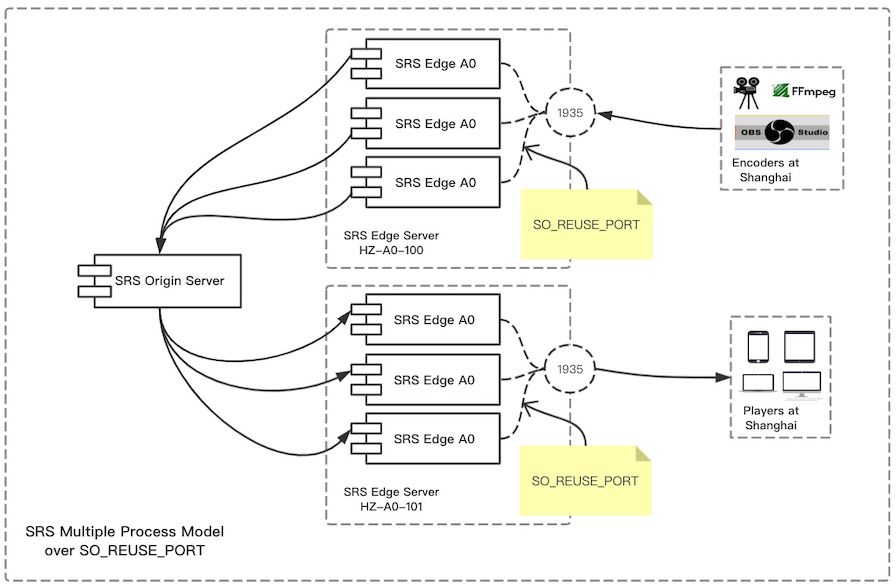
注意:SO_REUSEPORT功能需要Linux Kernel 3.9+,所以如果使用CentOS6你可能需要升级你的内核,推荐使用CentOS7。
首先,我们启动一个边缘服务器,侦听在1935:
./objs/srs -c conf/edge.conf
然后,在同一个服务器,再启动一个边缘服务器,也侦听在1935:
./objs/srs -c conf/edge2.conf
注意:当然这两个边缘服务器的pid文件路径要不同,否则会启动失败。
这样就启动了两个进程,都侦听在1935:
[root@bf2e88b31f9b trunk]# ps aux|grep srs
root       381  0.1  0.0  19888  5752 pts/2    S+   08:03   0:01 ./objs/srs -c conf/edge.conf
root       383  0.0  0.0  19204  5468 pts/1    S+   08:04   0:00 ./objs/srs -c conf/edge2.conf

[root@bf2e88b31f9b trunk]# lsof -p 381
srs     381 root    7u     IPv6  18835      0t0        TCP *:macromedia-fcs (LISTEN)
[root@bf2e88b31f9b trunk]# lsof -p 383
srs     383 root    7u     IPv6  17831      0t0        TCP *:macromedia-fcs (LISTEN)
接着,启动源站服务器,这两个边缘服务器从这个源站服务器取流:
./objs/srs -c conf/origin.conf
最后,我们可以推流到源站或边缘,从任意边缘服务器拉流播放:
    for((;;)); do \
        ./objs/ffmpeg/bin/ffmpeg -re -i ./doc/source.flv \
        -c copy \
        -f flv rtmp://192.168.1.170/live/livestream; \
        sleep 1; \
    done
使用VLC播放RTMP流: rtmp://192.168.1.170:1935/live/livestream
Welcome to SRS wiki!
SRS 5.0 wiki
Please select your language:
SRS 4.0 wiki
Please select your language:
SRS 3.0 wiki
Please select your language:
SRS 2.0 wiki
Please select your language:
SRS 1.0 wiki
Please select your language: