HOME > EN > Performance
Performance Banchmark


The performance benchmark for SRS, compare with nginx-rtmp single process.
Provides detail benchmark steps.
The latest data, read performance.
Hardware
The client and server use lo net interface to test:
- Hardware: VirtualBox on ThinkPad T430
- OS: CentOS 6.0 x86_64 Linux 2.6.32-71.el6.x86_64
- CPU: 3 Intel(R) Core(TM) i7-3520M CPU @ 2.90GHz
- Memory: 2007MB
OS
Login as root, set the fd limits:
- Set limit:
ulimit -HSn 10240 - View the limit:
[root@dev6 ~]# ulimit -n
10240
- Restart SRS:
sudo /etc/init.d/srs restart
NGINX-RTMP
NGINX-RTMP version and build command.
- NGINX: nginx-1.5.7.tar.gz
- NGINX-RTMP: nginx-rtmp-module-1.0.4.tar.gz
- Read nginx-rtmp
- Build:
./configure --prefix=`pwd`/../_release \
--add-module=`pwd`/../nginx-rtmp-module-1.0.4 \
--with-http_ssl_module && make && make install
- Config nginx:
_release/conf/nginx.conf
user  root;
worker_processes  1;
events {
    worker_connections  10240;
}
rtmp{
    server{
        listen 19350;
        application live{
            live on;
        }
    }
}
- The limit of fd:
[root@dev6 nginx-rtmp]# ulimit -n
10240
- Start:
./_release/sbin/nginx - Check nginx started:
[root@dev6 nginx-rtmp]# netstat -anp|grep 19350
tcp        0      0 0.0.0.0:19350               0.0.0.0:*                   LISTEN      6486/nginx
SRS
SRS version and build.
- SRS: SRS 0.9
- Build:
./configure && make - Config SRS:
conf/srs.conf
listen              1935;
max_connections     10240;
vhost __defaultVhost__ {
    gop_cache       on;
    forward         127.0.0.1:19350;
}
- Check limit fds:
[root@dev6 trunk]# ulimit -n
10240
- Start SRS:
nohup ./objs/srs -c conf/srs.conf >/dev/null 2>&1 & - Check SRS started:
[root@dev6 trunk]# netstat -anp|grep "1935 "
tcp        0      0 0.0.0.0:1935                0.0.0.0:*                   LISTEN      6583/srs
Publish and Play
Use centos to publish RTMP:
- Start FFMPEG:
for((;;)); do \
    ./objs/ffmpeg/bin/ffmpeg \
        -re -i doc/source.flv \
        -acodec copy -vcodec copy \
        -f flv rtmp://127.0.0.1:1935/live/livestream; \
    sleep 1;
done
- SRS RTMP stream URL:
rtmp://192.168.2.101:1935/live/livestream - Online play SRS RTMP: Online Player
- Nginx-RTMP stream URL:
rtmp://192.168.2.101:19350/live/livestream - Online play nginx-rtmp RTMP: Online Player
Client
The RTMP load test tool, read srs-bench
The sb_rtmp_load used to test RTMP load, support 800-3k concurrency for each process.
- Build:
./configure && make - Start:
./objs/sb_rtmp_load -c 800 -r <rtmp_url>
Record Data
Record data before test:
- Use top command:
srs_pid=`ps aux|grep srs|grep conf|awk '{print $2}'`; \
nginx_pid=`ps aux|grep nginx|grep worker|awk '{print $2}'`; \
load_pids=`ps aux|grep objs|grep sb_rtmp_load|awk '{ORS=",";print $2}'`; \
top -p $load_pids$srs_pid,$nginx_pid
- The connections:
srs_connections=`netstat -anp|grep srs|grep ESTABLISHED|wc -l`; \
nginx_connections=`netstat -anp|grep nginx|grep ESTABLISHED|wc -l`; \
echo "srs_connections: $srs_connections"; \
echo "nginx_connections: $nginx_connections";
- The bandwidth in NBps:
[root@dev6 nginx-rtmp]# dstat -N lo 30
----total-cpu-usage---- -dsk/total- -net/lo- ---paging-- ---system--
usr sys idl wai hiq siq| read  writ| recv  send|  in   out | int   csw
  0   0  96   0   0   3|   0     0 |1860B   58k|   0     0 |2996   465
  0   1  96   0   0   3|   0     0 |1800B   56k|   0     0 |2989   463
  0   0  97   0   0   2|   0     0 |1500B   46k|   0     0 |2979   461
- The table
| Server | CPU | Mem | Conn | ENbps | ANbps | sb | Lat |
|---|---|---|---|---|---|---|---|
| SRS | 1.0% | 3MB | 3 | - | - | - | 0.8s |
| nginx-rtmp | 0.7% | 8MB | 2 | - | - | - | 0.8s |
Memory(Mem): The memory usage in MB.
Clients(Conn): The connections/clients to server.
ExpectNbps(ENbps): The expect network bandwidth in Xbps.
ActualNbps(ANBps): The actual network bandwidth in Xbps.
srs-bench(srs-bench/sb): The mock benchmark client tool.
Latency(Lat): The latency of client.
Benchmark SRS
Let's start performance benchmark.
- Start 500 clients
./objs/sb_rtmp_load -c 500 -r rtmp://127.0.0.1:1935/live/livestream >/dev/null &
- The data:
| Server | CPU | Mem | Conn | ENbps | ANbps | sb | Lat |
|---|---|---|---|---|---|---|---|
| SRS | 9.0% | 8MB | 503 | 100Mbps | 112Mbps | 12.6% | 0.8s |
- The data for 1000 clients:
| Server | CPU | Mem | Conn | ENbps | ANbps | sb | Lat |
|---|---|---|---|---|---|---|---|
| SRS | 23.6% | 13MB | 1003 | 200Mbps | 239Mbps | 16.6% | 0.8s |
- The data for 1500 clients:
| Server | CPU | Mem | Conn | ENbps | ANbps | sb | Lat |
|---|---|---|---|---|---|---|---|
| SRS | 38.6% | 20MB | 1503 | 300Mbps | 360Mbps | 17% | 0.8s |
- The data for 2000 clients:
| Server | CPU | Mem | Conn | ENbps | ANbps | sb | Lat |
|---|---|---|---|---|---|---|---|
| SRS | 65.2% | 34MB | 2003 | 400Mbps | 480Mbps | 22% | 0.8s |
- The data for 2500 clients:
| Server | CPU | Mem | Conn | ENbps | ANbps | sb | Lat |
|---|---|---|---|---|---|---|---|
| SRS | 72.9% | 38MB | 2503 | 500Mbps | 613Mbps | 24% | 0.8s |
Benchmark NginxRTMP
Let's start performance benchmark.
- Start 500 clients:
./objs/sb_rtmp_load -c 500 -r rtmp://127.0.0.1:19350/live/livestream >/dev/null &
- The data for 500 clients:
| Server | CPU | Mem | Conn | ENbps | ANbps | sb | Lat |
|---|---|---|---|---|---|---|---|
| nginx-rtmp | 8.3% | 13MB | 502 | 100Mbps | 120Mbps | 16.3% | 0.8s |
- The data for 1000 clients:
| Server | CPU | Memory | Clients | ExpectNbps | ActualNbps | srs-bench | Latency
| nginx-rtmp | 27.3% | 19MB | 1002 | 200Mbps | 240Mbps | 30% | 0.8s |- The data for 1500 clients:
| Server | CPU | Mem | Conn | ENbps | ANbps | sb | Lat |
|---|---|---|---|---|---|---|---|
| nginx-rtmp | 42.3% | 25MB | 1502 | 300Mbps | 400Mbps | 31% | 0.8s |
- The data for 2000 clients:
| Server | CPU | Mem | Conn | ENbps | ANbps | sb | Lat |
|---|---|---|---|---|---|---|---|
| nginx-rtmp | 48.9% | 31MB | 2002 | 400Mbps | 520Mbps | 33% | 0.8s |
- The data for 2500 clients:
| Server | CPU | Mem | Conn | ENbps | ANbps | sb | Lat |
|---|---|---|---|---|---|---|---|
| nginx-rtmp | 74.2% | 37MB | 2502 | 500Mbps | 580Mbps | 35% | 0.8s |
Performance Compare
| Server | CPU | Mem | Conn | ENbps | ANbps | sb | Lat |
|---|---|---|---|---|---|---|---|
| nginx-rtmp | 8.3% | 13MB | 502 | 100Mbps | 120Mbps | 16.3% | 0.8s |
| SRS | 9.0% | 8MB | 503 | 100Mbps | 112Mbps | 12.6% | 0.8s |
| nginx-rtmp | 27.3% | 19MB | 1002 | 200Mbps | 240Mbps | 30% | 0.8s |
| SRS | 23.6% | 13MB | 1003 | 200Mbps | 239Mbps | 16.6% | 0.8s |
| nginx-rtmp | 42.3% | 25MB | 1502 | 300Mbps | 400Mbps | 31% | 0.8s |
| SRS | 38.6% | 20MB | 1503 | 300Mbps | 360Mbps | 17% | 0.8s |
| nginx-rtmp | 48.9% | 31MB | 2002 | 400Mbps | 520Mbps | 33% | 0.8s |
| SRS | 65.2% | 34MB | 2003 | 400Mbps | 480Mbps | 22% | 0.8s |
| nginx-rtmp | 74.2% | 37MB | 2502 | 500Mbps | 580Mbps | 35% | 0.8s |
| SRS | 72.9% | 38MB | 2503 | 500Mbps | 613Mbps | 24% | 0.8s |
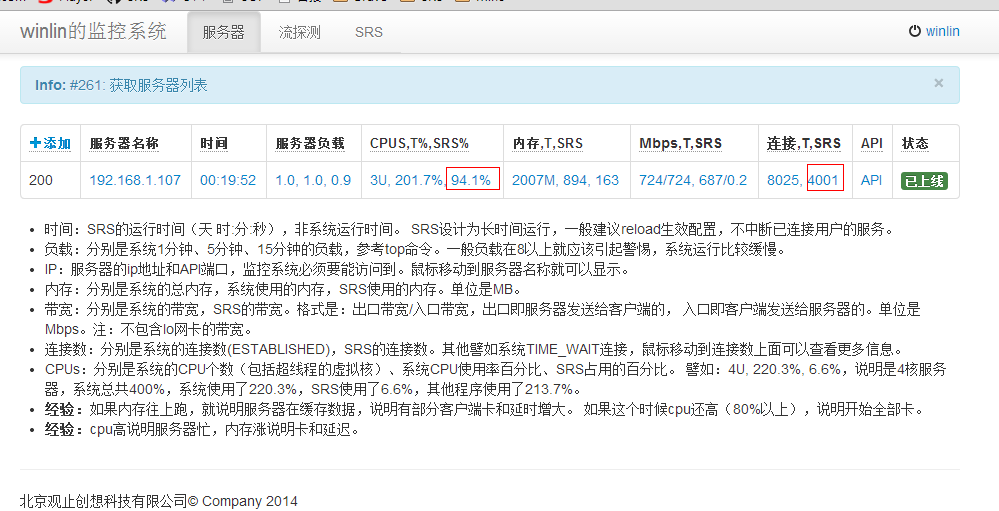
Performance Banchmark 4k
The performance is refined to support about 4k clients.
[winlin@dev6 srs]$ ./objs/srs -v
0.9.130
top - 19:52:35 up 1 day, 11:11,  8 users,  load average: 1.20, 1.05, 0.92
Tasks: 171 total,   4 running, 167 sleeping,   0 stopped,   0 zombie
Cpu0  : 26.0%us, 23.0%sy,  0.0%ni, 34.0%id,  0.3%wa,  0.0%hi, 16.7%si,  0.0%st
Cpu1  : 26.4%us, 20.4%sy,  0.0%ni, 34.1%id,  0.7%wa,  0.0%hi, 18.4%si,  0.0%st
Cpu2  : 22.5%us, 15.4%sy,  0.0%ni, 45.3%id,  1.0%wa,  0.0%hi, 15.8%si,  0.0%st
Mem:   2055440k total,  1972196k used,    83244k free,   136836k buffers
Swap:  2064376k total,     3184k used,  2061192k free,   926124k cached

  PID USER      PR  NI  VIRT  RES  SHR S %CPU %MEM    TIME+  COMMAND
17034 root      20   0  415m 151m 2040 R 94.4  7.6  14:29.33 ./objs/srs -c console.conf
 1063 winlin    20   0  131m  68m 1336 S 17.9  3.4  54:05.77 ./objs/sb_rtmp_load -c 800 -r rtmp://127.0.0.1:1935/live/livestream
 1011 winlin    20   0  132m  68m 1336 R 17.6  3.4  54:45.53 ./objs/sb_rtmp_load -c 800 -r rtmp://127.0.0.1:1935/live/livestream
18736 winlin    20   0  113m  48m 1336 S 17.6  2.4   1:37.96 ./objs/sb_rtmp_load -c 800 -r rtmp://127.0.0.1:1935/live/livestream
 1051 winlin    20   0  131m  68m 1336 S 16.9  3.4  53:25.04 ./objs/sb_rtmp_load -c 800 -r rtmp://127.0.0.1:1935/live/livestream
18739 winlin    20   0  104m  39m 1336 R 15.6  2.0   1:25.71 ./objs/sb_rtmp_load -c 800 -r rtmp://127.0.0.1:1935/live/livestream
[winlin@dev6 ~]$ dstat -N lo 30
----total-cpu-usage---- -dsk/total- ---net/lo-- ---paging-- ---system--
usr sys idl wai hiq siq| read  writ| recv  send|  in   out | int   csw
  3   2  92   0   0   3|  11k   27k|   0     0 |   1B   26B|3085   443
 32  17  33   0   0  17| 273B   60k|  69M   69M|   0     0 |4878  6652
 34  18  32   0   0  16|   0    38k|  89M   89M|   0     0 |4591  6102
 35  19  30   0   0  17| 137B   41k|  91M   91M|   0     0 |4682  6064
 33  17  33   0   0  17|   0    31k|  55M   55M|   0     0 |4920  7785
 33  18  31   0   0  17|2867B   34k|  90M   90M|   0     0 |4742  6530
 32  18  33   0   0  17|   0    31k|  66M   66M|   0     0 |4922  7666
 33  17  32   0   0  17| 137B   39k|  65M   65M|   0     0 |4841  7299
 35  18  30   0   0  17|   0    28k| 100M  100M|   0     0 |4754  6752
 32  17  33   0   0  18|   0    41k|  44M   44M|   0     0 |5130  8251
 34  18  32   0   0  16|   0    30k| 104M  104M|   0     0 |4456  5718
Performance Banchmark 6k
SRS2.0.15, not SRS1.0, performance is refined to support 6k clients. That is 4Gbps for 522kbps bitrate, for a single SRS process. Read https://github.com/ossrs/srs/issues/194
Performance Banchmark 7.5k
SRS2.0.30 refined to support 7.5k clients, read https://github.com/ossrs/srs/issues/217
Winlin 2014.11